
Brief
What's moving your markets today, the graded headlines and the calendar, each release opened up.
The news moved your pair and you didn't see it coming.
What's moving your markets, the headlines that matter and the releases due, every morning in plain words.
The brief, the graded headlines and a release opened up, for the markets you trade.
Three steps. The first is already done.
You did this when you joined. The desk follows those markets and nothing else.
What's moving your markets, the headlines graded A, B or C, and the releases due.
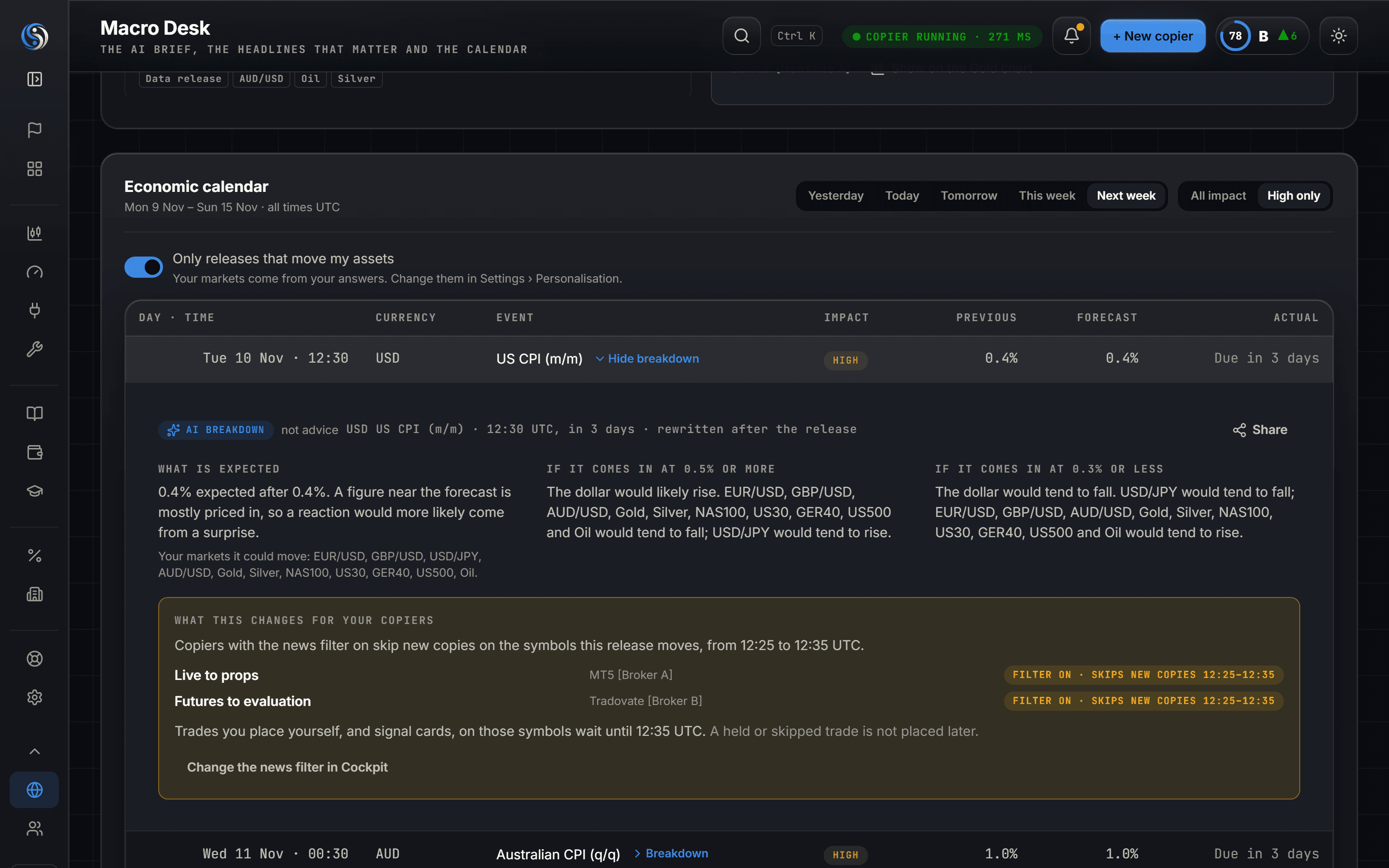
What it is, what tends to happen, and which copies a news hold would skip.
Switch markets on and off, and open any release for its breakdown.
Three tabs, each for the markets you trade.
What's moving your markets today, the graded headlines and the calendar, each release opened up.
The levels traders watch on each of your markets, and what the main indicators say.
Inflation, where the Fed, ECB, BoE and BoJ lean, and consumer and business spending.
The desk reads the same calendar as the news hold in Vigil and Heimdall.
With the news hold on for an account, new copies on these four into it are skipped during the window, not placed later. Trades already open are untouched.
Example figures, not a real accountTrading involves risk and you can lose money. Nothing on the desk is financial advice.
The desk never tells you to buy, sell or enter. Every AI-written part is labelled.
The desk sends no signals and places no trades. The news hold is a setting of Vigil and Heimdall on each account.
The desk cannot read it. Set the window wider than your firm asks.
Three reasons to open it before the session.
A release can erase a setup in a minute. Know when, and on which symbols.
One spike ends a challenge. Heimdall, your prop firm rule manager, locks the account first.
See which copies a news hold would skip, and for how long, before it happens.
The same calendar feeds the copier, the chart, the signal copier and the journal.
Yes, for every member on every plan, Free included. It runs on our AI key, not your monthly AI allowance.
No. The desk describes what tends to happen around releases and why a headline may matter. It never tells you to buy, sell or enter, and every AI-written part is labelled. Trading involves risk and you can lose money.
The ones you trade. It follows the markets you chose when you joined, and you can change them in Settings › Personalisation. Futures follow what they track, so ES follows US500.
A scheduled economic calendar with the forecast and the previous reading for each release, and the actual when it is available. The same calendar drives the news hold in Vigil and Heimdall.
High-impact ones, for the currencies of each symbol. Medium and low releases change nothing. Switch the hold on for an account in the Toolkit, in Vigil or Heimdall. The trades you place there from the chart or the signal copier wait from 5 minutes before to 5 minutes after unless you set your own window. New copies into that account in that window are skipped, never placed late. Closes and stop moves still follow the Provider, and trades already open are untouched.
No. Read your firm's rule, then set Heimdall's news hold wider than the firm asks. Heimdall, your prop firm rule manager, also enforces the firm's loss limits on the account itself.
By how likely they are to move your markets: A likely, B may, C background. Open a headline to read why it got its grade.
Technicals shows the price levels traders watch and what the main indicators say for each of your markets. Tracker keeps the big numbers in one place: inflation, what the central banks are leaning towards, and consumer and business spending.
Join free and tell us what you trade. The desk is on every plan, filtered to your markets from the first morning.